Investigations
AI endpoint diagnostics. Evidence for your next step.
Give GenticFlow an IT question. It collects live device evidence, tests possible causes, and records findings technicians can review. Troubleshoot one endpoint or investigate an issue across a fleet.
For IT teams and MSPs. Read-only investigation; follow-up actions remain under your controls.
From a support question to diagnostic findings.
Start with the question
Select the affected endpoint and describe the symptom, when it started, and what changed. Review the proposed investigation plan before starting.
Collect live evidence
GenticFlow runs read-only diagnostic checks on the connected device. Services, processes, logs, disk, and network state help test the possible causes.
Review the findings
Follow the diagnostic steps and review the saved conclusion with its supporting evidence. See what was established, what remains uncertain, and which checks need follow-up.
Diagnostic example
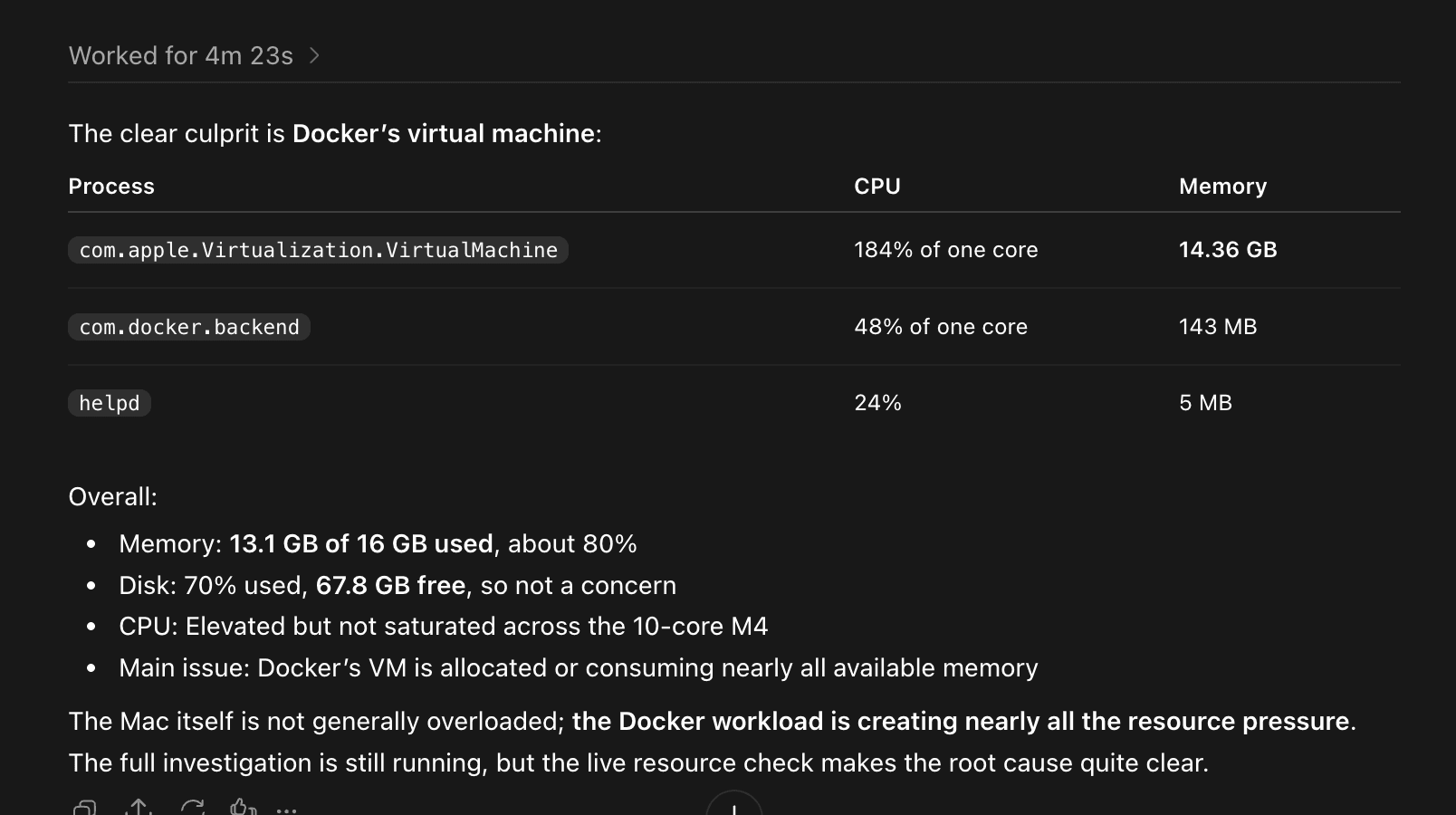
What is using this Mac's resources?
In this published MCP example, a technician asks GenticFlow through ChatGPT to investigate a Mac mini. The interim response shows process CPU and memory readings and identifies Docker's virtual machine as a major resource consumer. The full investigation is still running.
Choose the scope the issue needs.
Endpoint Investigations
Investigate one device using live checks and available historical context. Ask why a laptop is slow, a service keeps stopping, or a VPN connection fails after sleep.
Fleet Investigations
Investigate selected groups of endpoints, compare findings, and review a combined conclusion with per-device context and coverage. Check whether an issue affects one machine or a wider group.
General Investigations
Research a technical question using available documentation, knowledge, and investigation history. This path works without an attached endpoint and does not collect live device evidence.
Review findings and recorded commands, export the result, or start a follow-up investigation. Historical context remains distinct from fresh checks. An inconclusive result identifies where further work is needed.
Explore endpoint troubleshooting.
Endpoint Diagnostics Guide
What to collect, how to interpret the evidence, and what a useful diagnostic report contains.
Slow Computer Investigation
Follow an illustrative performance case from resource readings to a technician handoff.
VPN Ticket Diagnosis
Explore endpoint checks for client state, routing, DNS, and authentication symptoms.
Agent Requirements
Check supported operating systems and connectivity requirements before deployment.
FAQ
Questions about endpoint investigations.
What is collected, what stays read-only, and how to evaluate the result.
What is endpoint diagnostics software?
It collects and helps interpret device state for troubleshooting: processes, memory, disk, services, logs, and network configuration. GenticFlow Investigations uses read-only checks to answer a specific IT question and retains the findings for technician review.
Does an Investigation make changes to the device?
Investigations use read-only diagnostics. A finding or recommended action is not a completed repair. Any follow-up remediation uses a separate action or workflow and remains subject to the applicable permissions and approval policies.
Which endpoints can I investigate remotely?
Live endpoint investigations require a connected GenticFlow agent on Windows, macOS, or Linux and access to that endpoint. Available checks depend on the operating system, permissions, and the evidence the device can provide. See the system requirements before deploying agents.
What happens when evidence is missing or the endpoint is offline?
An offline endpoint cannot provide fresh diagnostic results. Cached inventory or a previous finding can provide context, but does not establish the device's current state. An investigation can be inconclusive; review the missing checks before deciding on the next action.
Do I need to start from a ticket?
No. Technicians can start from the Investigations page by selecting an endpoint or a fleet scope, or by asking a general technical question. Investigations can also support ticket work. API and MCP access provides another entry point where included in your plan and enabled for the connection.
How do I evaluate the results?
Use a representative issue from your support queue. Check that the conclusion answers the original question, links findings to collected evidence, distinguishes current observations from historical context, and identifies unresolved checks. Verify any subsequent fix separately before treating the issue as resolved.
Bring a question from your support queue.
See the diagnostic steps, review the evidence, and discuss what your technicians would do next.